


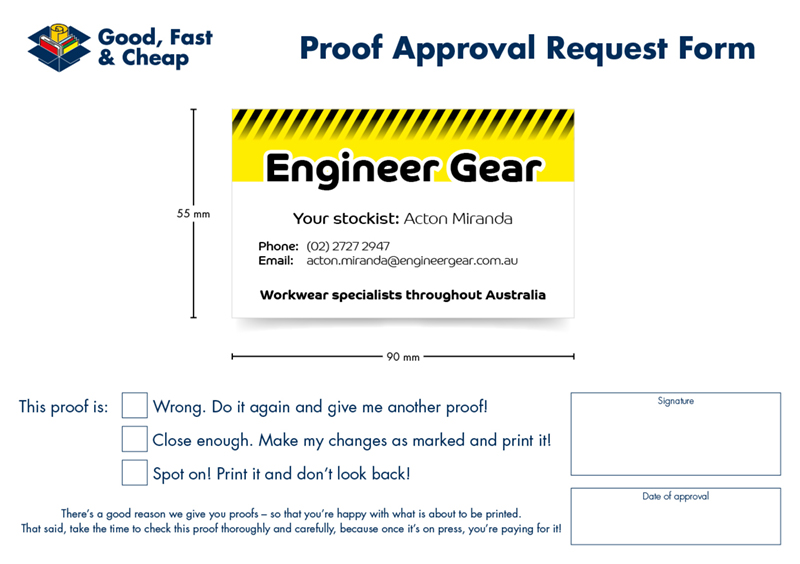
UPDATE 2016-02-22: The script has now been updated to v1.07 and contains some new features. See the video below:

From time to time, one of the boring and repetitive tasks that prepress operators or designers have to do is draw lines that indicate the height and width of the artwork on a proof. For example:


That’s why this year, I’ve released a beta version of the Draw arrows around an object script. It works like this:

In this instance, I would like to apply the measurement arrows around this business card. There is a .25pt keyline that is on the frame, so I have set the stroke to align to the inside edge. Click on the object that you would like to draw the measurement lines around and then run the script from the scripts panel.

The script will run, and moments later will return the measurements and the lines.

The default font used is Minion, but it can be changed as it has a style associated with it called labelmeasures, so let’s change it to something that matches the style.

And we’re done. Some things worth mentioning about the script:
- It applies the measurements to one object or grouped selection at a time. If several ungrouped objects are selected, the script will add rulers to the object that was placed on the page first.
- If the object being measured has a keyline applied to it, be sure to set the keyline to the inside edge.
- It works beyond millimetres, including centimetres, pixels, points and inches.
- It is a beta, so there is still room for improvement and suggestions. Any feedback about this script (or any others on Colecandoo) can be made on the contact page.
That said, the script is my Holiday gift to readers and followers. Enjoy!