


The chartwell font is a unique font that uses ligatures and stylistic sets to create both percentile graphs (such as pie graphs) as well as bar graphs. More information on the font can be found here.
Using this font solves an ongoing issue for users of Data Merge within InDesign: how to create variable graphs or charts using the data in the linked text file only. First suggested by David Blatner’s InDesignSecrets piece, the last Colecandoo blogpost examined some “hacks” to further improve on the font in creating variable graphs or charts
There is a particular font in this family called Chartwell Bars that has a distinct advantage over the others in the family and that is that, when utilising the stylistic set, the font can represent whole values between 1-1000, whereas all other fonts in the family will represent only whole values between 1-100.
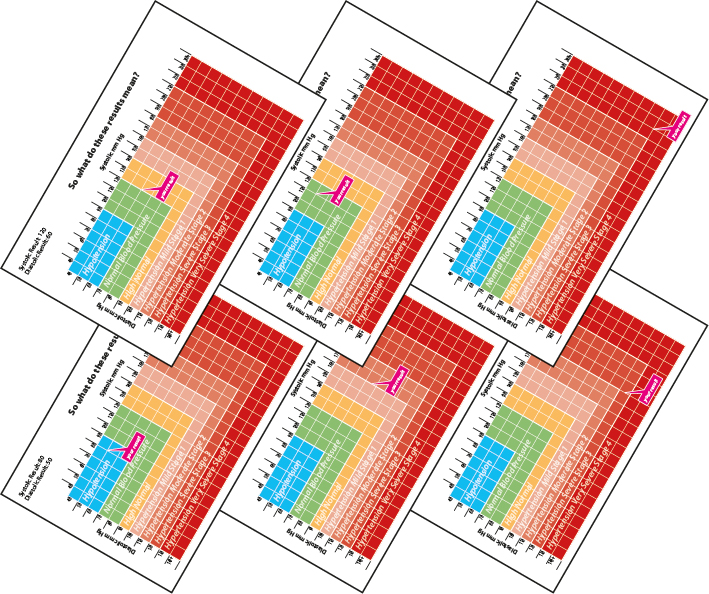
However, an unintended and alternative use for Chartwell Bars makes it perfect for plotting X and Y coordinates for producing variable results. To demonstrate how, take the following example of a blood pressure chart that is part of a data merge that contains two fields – the X and Y axis of the chart.
Using a combination of Data Merge, Anchored Objects and the “no fill, no stroke” trick (demonstrated on this blog before) to the Chartwell Bars font, the “your result” callout is able to move in two dimensions according to the result of the Data Merge.


A PDF demonstrating the proof of principle can be found here. Unlike other PDFs available for download from Colecandoo, this does not contain working files within the PDF due to licencing restrictions of the font.